
What is Page Speed Optimization?
We know page speed optimization is necessary, but exactly what is it and how important is it to your online success? Page speed, or page load time, is a measurement of the time it takes from the first click to full display of the content on any specific page on your website. This is not…

Written by Michael Mitov
Last updated May 3, 2025 • First published March 5, 2021
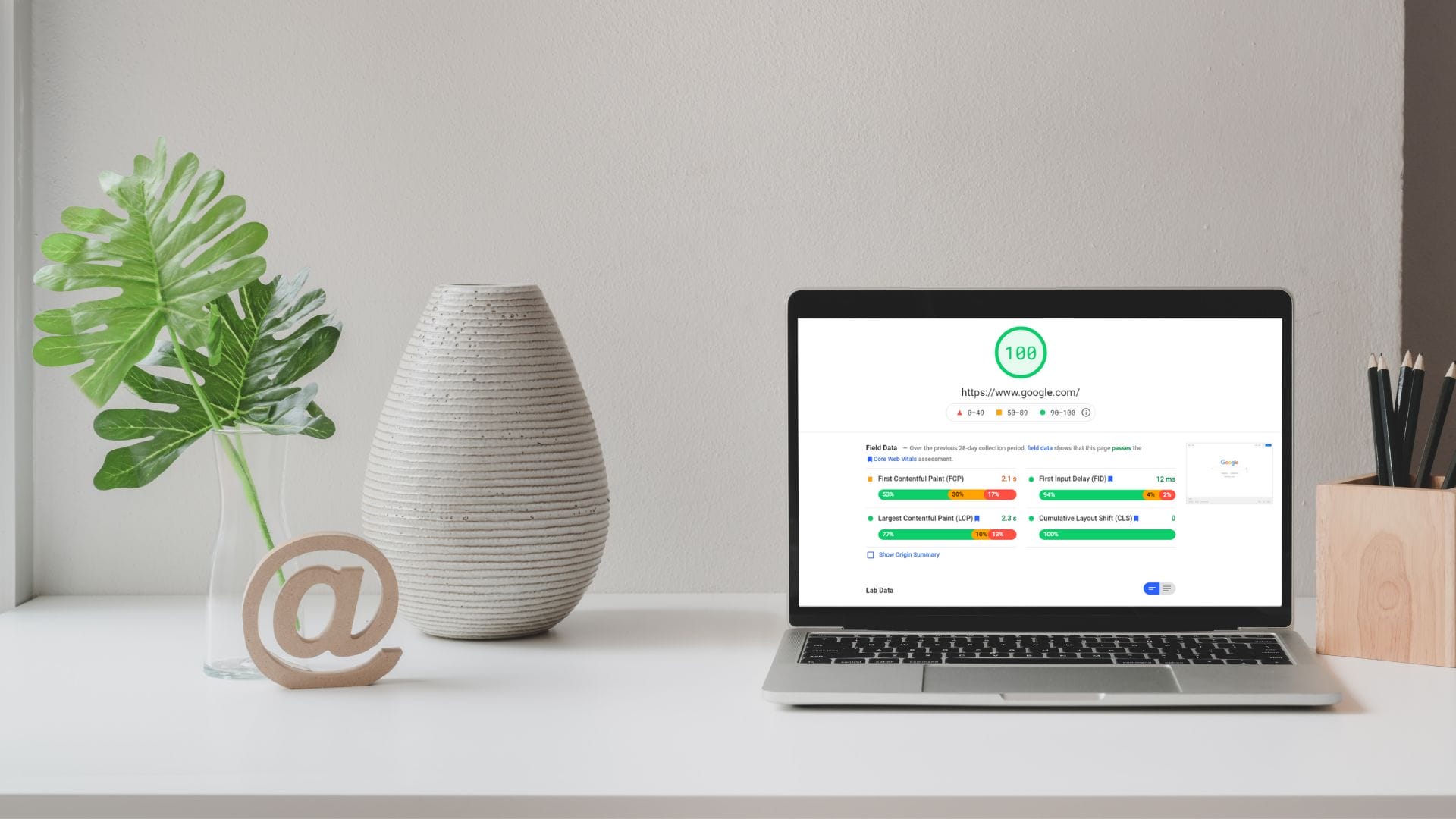
We know page speed optimization is necessary, but exactly what is it and how important is it to your online success?
Page speed, or page load time, is a measurement of the time it takes from the first click to full display of the content on any specific page on your website. This is not to be confused with ‘site speed’, which measures the page speed of a sample of pages on your website.
It’s also worth mentioning here that page speed is also measured by Google as time to first byte (TTFB). This is the measurement of time it takes for your browser to receive the first byte of information from the web server.
For user experience, however, and for the purposes of this page speed optimization article, we will be referring to page speed as page load time.
Pop quiz: how fast should your website be to make a good first impression on your visitors?
The conventional answer is three to five seconds. It should be enough time for the reader to scan the page and decide whether to continue or not.
But for Google, this is a trick question.
LIKE WHAT YOU’RE READING?
If these articles are helpful,
imagine what our team
can do for you!
Let’s identify the quick wins you can easily apply to your website.


Not Sure What Your Website Needs Anymore?
Search has changed. AI tools are influencing visibility. Let’s clarify what actually matters for your business now.
Not Sure What Your Website Needs Anymore?
Search has changed. AI tools are influencing visibility. Let’s clarify what actually matters for your business now.
A white paper published in 2010 revealed that if the search engine giant has its way, your page speed should be half a second.
Of course, even Google does not think that it is possible, so it is making concessions and moved the needle to two seconds. So, if your page speed meets that benchmark, congratulations!
Unfortunately, not a lot of businesses conduct an audit of their websites to determine the average page speed.
These companies are seriously shooting themselves in the foot considering that website speed is inversely proportional to the bounce rate.
What is bounce rate, by the way? It refers to the percentage of visitors who leave your site without checking the other pages.
The formula is quite straightforward:
The slower your page speed is, the higher the bounce rate would be.
Here is a handy guide from Google after surveying nearly a million websites from across the globe:
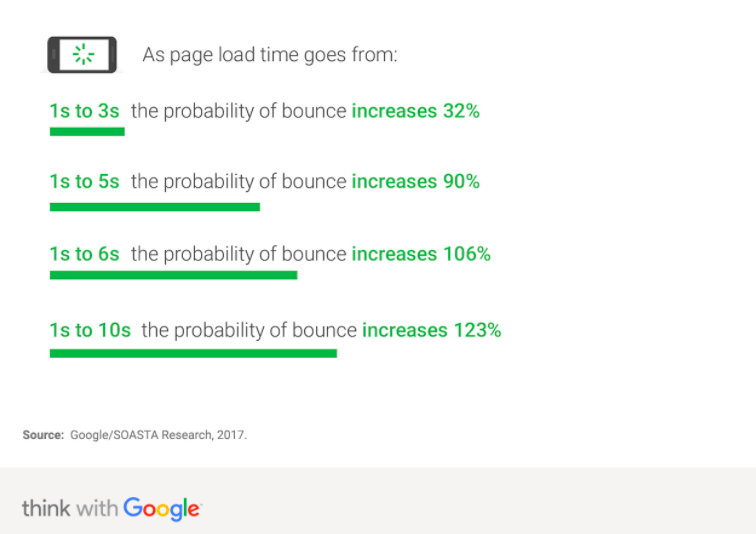
As you can see, you are pushing your customers toward your competitors if it takes your website more than five seconds to load. You need page speed optimization if you want to compete.
A website is not simply your digital address. It is your gateway to reach out to new customers while staying connected to your loyal patrons.
So, if you have two seconds to make a first impression, what will you do?
Page Loading Speed and Page Response Time, What is the Difference?
The page loading time refers to the period from the first click until the page loads the full content on your website. From the first click, your website should already have displayed all essential elements like HTML, CSS, scripts, third-party resources, and content.
Google defines it as TTFB or “time to first byte.”
The response time, meanwhile, measures the swiftness by which the user’s inquirer receives a response from the server. Multiple factors affect the response time, among these are:
- Connection time
- DNS lookup
- First byte
- Last byte
- Redirect time
The response time is out of your control unless you switch servers or upgrade your package with a lower latency rate.
Google looks at both elements when evaluating your website for its rankings.
Regrettably, nearly half of the websites do need page speed optimization because their page speed is between 6-10 seconds (or more).
Only two percent of the total two billion websites existing today meet the three-second-or-less standard, as shown by the Unbounce graphic below.

Why is response time crucial? In 2008, the Aberdeen Group released a study, which concluded that a business loses seven percent in conversion for every second of delay in response time.
Since then, multiple studies have only confirmed the correlation between the website speed and the conversion rate.
- A website that loads 500ms slower will result in a 20% drop in traffic.
- Walmart recorded a two-percent increase in conversions by boosting its page speed by one second. (Yes, page speed optimization can do that!)
- Amazingly, Amazon also recorded that every second of speed loss is equivalent to $1.6 billion in potential sales lost.
- Nearly 8 in 10 consumers will likely buy a product from a website that allows for a quicker transaction.

Impact of Page Speed Optimization on Rankings
Google’s algorithm is one of the most confidential equations in the world today. Perhaps, it only ranks below Krabby Patty’s secret formula in terms of importance.
However, the search engine giant drops a kernel now and then, which serves as a cue for marketers.
While content is king when it comes to SEO, do not forget to employ best practices in your website development.
Google places major emphasis on the user experience when ranking a website. It is the reason why you will likely get flagged when your website has a high bounce rate.
When assessing user experience, you will be surprised to Google pays closer attention to speed-related elements:
- Bounce rate – refers to the time they click on the site until they leave.
- Pages per session – how many pages they click for each visit
- Time on site – how long they stayed on your website
How to Know Your Website Speed
Google has a free tool to determine how fast your page loads, and it is called the PageSpeed Insights.
You only need to input your website’s URL and the page will do the rest.
However, you can also try several tools in the market today to determine website speed:
- Pingdom – Its asset is its simplicity. Like PageSpeed Insights, you only need to enter your URL and start the test. You can also gauge how fast your page speed is on a metric that matters most–the location where people are accessing your website.
- Uptrends – You can test your page speed on multiple platforms while also receiving actionable tips to improve your website’s performance. You can also conduct the test on 35 different locations and receive a waterfall report afterward.
- WebPage Test – The tool’s report is quite comprehensive, which ensures that you have the data at your disposal to shape your page speed optimization strategy. You also do not need a data scientist to explain the numbers because everything is organized. The test itself is fast, only a matter of seconds, which is handy when you need to go back to your busy schedule.
- YSlow – YSlow is an open-source project that is billed to be an alternative to Google’s PageSpeed Insights. It is, however, specifically designed for Yahoo! rules. They are the best practices that will supposedly speed up your website. For example, Yahoo! recommends that you reduce the HTTP requests, use a content delivery network, eliminate duplicate content, or arrange the scripts at the bottom and the stylesheet at the top.
- GTMetrix – The tool not only tests your page speed but also tells you why your website is slow to load. Since the results are itemized, you can quickly pinpoint the problem areas and make the necessary corrections to your page speed optimization.
How Do You Increase Your Page Speed
Boosting your website speed is not as easy as writing a few lines on the source code. Your SEO agency will employ the process of elimination or scientific trial-and-error to determine why your page speed is not up to par.
- Compress your files – One way to do this is to utilize Gzip. The tool allows you to reduce the size of your files (HTML, JavaScript, CSS). The process is automatic and covers files larger than 150 bytes. In the same manner, you can also minimize y our files using UglifyJS and CSSNano to format codes and eliminate unused codes.
- Optimize time to first byte – The response time not only hinges on your host server. You need to audit your website to pinpoint the obstructions, such as server memory problems, slow routing, and database queries. Benchmark your response time to under 200ms.
- Cut down on the HTTP requests – Developers know that the front-end elements drastically impact response time. A good chunk of the time involves downloading the essential components on the page, including the scripts, Flash, stylesheets, and images. You can shrink the number of elements to reduce the rate of HTTP requests to load the page. But eliminating these elements will put you at risk of oversimplification. As a result, your website will end up boring. It is crucial to strike a balance between visually appealing and restraint.
- Content Delivery Network — When you rely on a single server, the tendency is that you may encounter gridlock during busy times. As a result, your page speed suffers. The solution is a CDN that will redistribute your content on servers across multiple locations. Your website page does not magically improve. Instead, you improve user experience because the loading time is quicker since you are tapping into a server closet to them.
- Minimize redirects – Redirects are important because they point the user to the right path as they navigate your website. However, they will also slow down your website speed if you are not careful. However, even an amateur designer can quickly catch redirects, so it is a fairly easy problem to solve. You can also use Google PageSpeed to spot redirects on your website. One simple way is to remove the plugins to remove unnecessary redirects.
- Optimize your images – You can use image maps so that you can merge several images into one. Do not worry since the resolution remains the same. However, it reduces the number of steps during the HTTP requests. Another way is to use CSS Sprites that will merge your background images into one.
The size of your image will affect your page speed. The next question is, how large is the photo that you upload on your site?
Too small, and your image will appear pixelated. Too large, and it will halt your page speed to a crawl.
Here are some page speed optimization tips to follow:
- For background visuals, which require larger images, limit the size to 1 MB or less.
- Save your graphics, infographics, and logos as PNG.
- Photos should always be JPEG since you can make the necessary corrections easily using editing software tools. PNG files are higher-quality but they also require more space.
- The images must be between 1500 and 2500 pixels in terms of width. Some website building tools will automatically optimize larger images to a maximum of 2500 pixels.
There are other ways to optimizing your image but it is a topic for another day. An experienced web designer can easily do this to ensure that your website is SEO-ready.
Conclusion
Page speed optimization is a crucial part of SEO, but most businesses sadly overlook it. But it is not entirely their fault because they presume that everything is plug-and-play once they launch their websites. They believe that it is the web host’s responsibility to deliver a fast-loading product.
The good news is that improving your website speed is not a complicated task to improve your Google rankings. Just follow the tips above, or you can hire the pros to optimize your page speed at a cost-effective rate.
Want to know more about page speed optimization?
Contact 1st on the List today by calling 1-888-262-6687 or email us at [email protected]. Plus, keep an eye on our blog for our upcoming post on all the best ways to improve your website page speed!
Michael Mitov
Michael Mitov is a Website Developer and SEO Project Manager at the 1st on the List head office in Abbotsford. With over 18 years of experience in his field Michael specializes in WordPress Development, Local Search, and Lead Pages and Sales Funnels. When not launching new websites and achieving visibility for his clients Michael is busy staying on top of SEO and marketing trends or biking and hiking in the beautiful British Columbia.
![A promotional graphic with the text "Is Your SEO Still Working in 2026?" and a blue button labeled "Book a Discovery Call." Below, it says "[No hassle, no pressure, just 30 minutes of insights]." The background has abstract blue shapes.](https://e28vvfjnij8.exactdn.com/wp-content/uploads/2024/09/blog-sidebar-cta-2-1.png?strip=all)
Don’t miss out – get newest posts straight to your inbox!
OTHER ARTICLES WE THINK YOU’LL ENJOY


Partner With Us. Get More Leads.
Stop trying to do it all on your own – reach out to our team and we can discuss marketing strategies that are best suited for your business!
“Your expertise has been a tremendous asset to our company … in the last 6 months of 2024, we had larger average job size, qualified leads and some we didn’t need to bid and compete for.”
“We have seen a steady increase in web traffic and quality leads since first working with 1st on the List. And we continue to see monthly increases through their efforts.”
“They have helped my firm grow organic web traffic month over month and their ongoing support and guidance is something you don’t typically receive from other established competitors.


[NO HASSLE, NO PRESSURE, NO WORRIES – JUST MEANINGFUL INSIGHTS]